For the last decade, the paradigm of software design has been rigid: designers create mockups, developers code them, and users navigate them. Everyone gets the same dashboard, the same menus, and the same friction.
But with the rise of Large Language Models (LLMs), a new paradigm has emerged. Generative UI (GenUI) is shifting software from static pages to "radically adaptive interfaces." Instead of forcing users to learn a piece of software, the software now adapts in real-time to the user's intent.
This article analyzes the current state of GenUI, synthesizing insights from industry leaders like Vercel, Google, and CopilotKit, to provide a comprehensive roadmap for developers, designers, and product leaders.
What is Generative UI? (And What It Isn't)
There is often confusion between "AI-assisted design" and "Generative UI."
AI-Assisted Design: Tools like Google Stitch or Figma AI that help designers generate wireframes or code during the development process. The end result is still a static app delivered to the user.
Generative UI (GenUI): A runtime experience where the interface is constructed on the fly for the end-user. The application detects the user's specific intent and data context, then renders a bespoke UI - charts, forms, interactive widgets—to answer that specific need.
As the Nielsen Norman Group describes it, this is Outcome-Oriented Design. The interface is no longer a map the user must navigate; it is a destination created instantly around the user's goal.
The Three Architectures of Generative UI
Not all GenUI is built the same. Based on the analysis of frameworks like CopilotKit and Thesys, GenUI falls into a spectrum of control versus freedom.
1. Static Generative UI (The "Lego" Approach)
Here, the LLM acts as a selector. The developer pre-builds high-quality React/Vue components (weather cards, stock tickers, flight trackers). The AI analyzes the conversation and decides which component to show and what data to populate it with.
Best for: Enterprise apps, banking, and mission-critical dashboards where brand consistency and accuracy are non-negotiable.
Pros: High visual polish, zero risk of broken HTML, consistent branding.
Cons: Limited to what the developer has pre-built; cannot invent new UI patterns.
2. Declarative Generative UI (The "Schema" Approach)
The middle ground. The AI returns a structured specification (usually JSON) that describes a layout - "a column with a header and three list items." The frontend interprets this spec and renders it using a design system.
Best for: Admin panels, dynamic forms, and CRM tools (like Salesforce's Generative Canvas) where layouts need to vary but components should look standard.
Pros: Scalable; the AI can rearrange layouts without breaking the design system.
Cons: Requires a robust rendering engine to interpret the JSON specs.
3. Open-Ended Generative UI (The "Canvas" Approach)
The AI generates raw HTML, CSS, or JavaScript code to render entirely new interfaces in an iframe or sandboxed environment.
Best for: Creative tools, prototyping, and "Code Interpreter" style features (e.g., "Make me a snake game").
Pros: Infinite flexibility; the AI can build things the developer never anticipated.
Cons: High security risk (XSS), inconsistent styling, and potential for "hallucinated" UI that doesn't work.
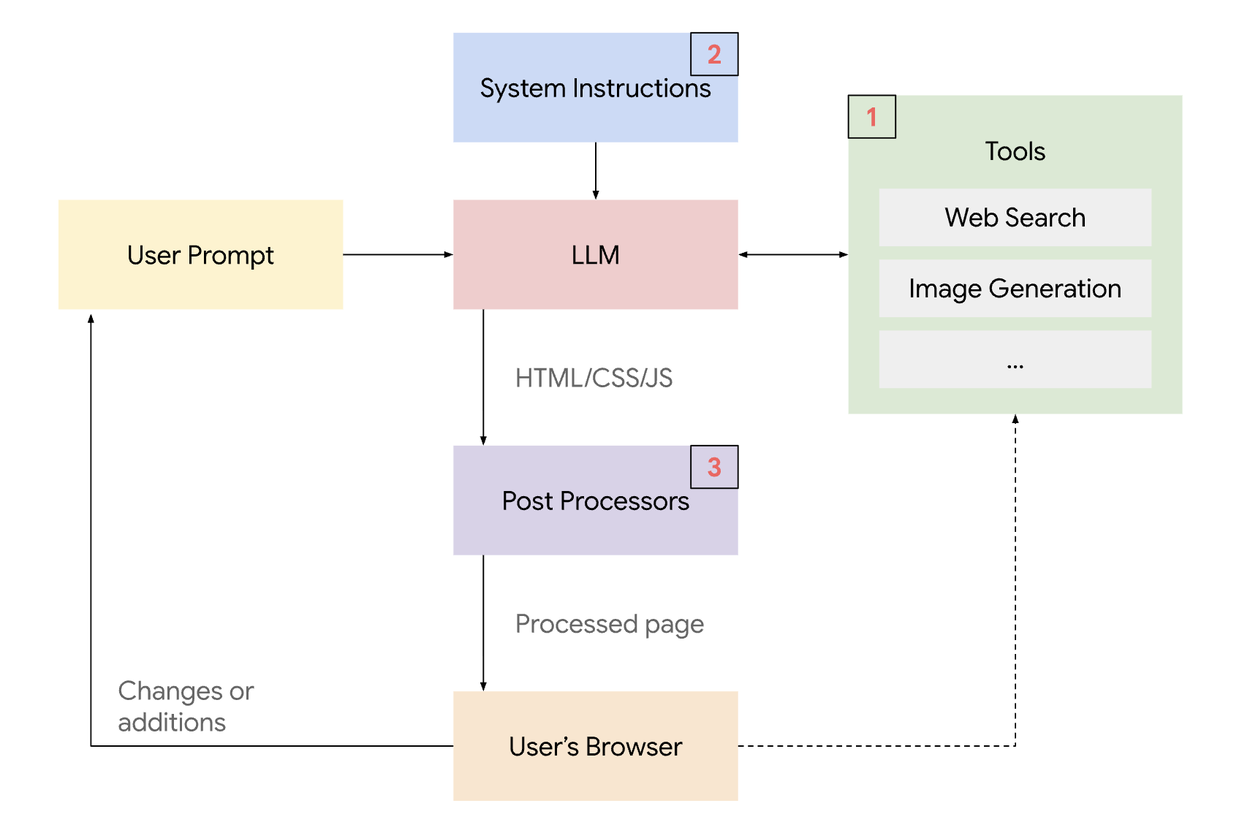
A high-level system overview of the generative UI implementation - Google
Application Surfaces: Where GenUI Lives
GenUI is moving beyond the simple "chatbot sidebar." We are seeing three distinct interaction models emerge:
The Chat (Threaded)
The standard interface used by ChatGPT or basic support bots. The UI appears inline as a bubble within the conversation history.
Use case: Quick queries, getting a specific data point (e.g., a weather widget).
The Chat+ (Co-Creator Canvas)
Popularized by Claude Artifacts and OpenAI Canvas. The screen is split: conversation on the left, a persistent "workspace" on the right. The user iterates on the content in the workspace through chat.
Use case: Writing code, editing documents, analyzing complex visualizations. This is the sweet spot for productivity tools.
The Chatless (Invisible AI)
The most advanced integration. There is no chat box. The application simply observes user behavior or data context and morphs the UI accordingly.
Use case: A "smart" CRM that rearranges the dashboard based on whether the salesperson is preparing for a call or closing a deal.
The Technical Stack: How It Works
Building GenUI requires a shift in mental models for developers. It leverages the Tool Calling (or Function Calling) capabilities of modern LLMs.
Intent Recognition: The user asks a question (e.g., "How are my sales doing?").
Tool Selection: The LLM (e.g., Gemini 3, GPT-5.2, Claude 4.5) recognizes that it shouldn't just write text. It selects a "tool" defined by the developer (e.g.,
displaySalesChart).Data Retrieval: The system fetches the necessary real-time data from the database.
Component Hydration: The data is passed to a frontend component (e.g., a Recharts graph) rather than being returned as a text paragraph.
Streaming: Libraries like Vercel AI SDK or CopilotKit stream this interaction, allowing the UI to render progressively, reducing perceived latency.
The Challenge: Usability vs. Consistency
The biggest criticism of GenUI (noted by design experts) is the loss of mental models. If an app looks different every time a user logs in, how do they learn to use it?
The Solution: Grounded Consistency
To solve this, successful GenUI follows a "Grounded Consistency" approach:
Fixed Global Navigation: Never change the core navigation or escape hatches.
Design Systems: The AI should not be choosing colors or fonts. It should be assembling pre-approved components from your design system (like Salesforce Lightning or Material UI).
Human in the Loop: Always allow the user to edit the data the AI used to generate the UI. If the AI generates a chart, let the user toggle the variables.
Performance Note: As seen with the Rabbit R1, generating UI on the fly can be slow (latency). Developers must use skeleton loaders and optimistic UI updates to keep the application feeling snappy while the LLM "thinks."
Decision Matrix: Should You Build It?
Before implementing GenUI, apply this decision matrix to your use case:
Scenario | Recommended Approach | Why? |
|---|---|---|
User needs precise, repetitive data. | Static UI | Don't reinvent the wheel. A standard dashboard is faster. |
User needs to explore complex, changing data. | Static GenUI | Let AI choose the right chart, but use standard chart components. |
User needs to build or prototype. | Open-Ended GenUI | Maximum freedom is required for creation tasks. |
User workflow varies strictly by role/context. | Declarative GenUI | A salesperson needs a different view than a manager; AI can restructure this dynamically. |
The Future: Agentic UI
We are moving toward Agentic UI. In this future, AI agents won't just answer questions; they will navigate applications for us. Tools like Google’s Gemini in "AI Mode" are already demonstrating the ability to generate interactive simulations for learning.
For developers and designers, the message is clear: Stop building static pages for every possible edge case. Start building robust systems of components that AI can assemble to solve user problems in real-time.
Looking to build GenUI? Contact us today for a consultation on custom UI.