The landscape of AI video generation has matured dramatically. Today's models can produce cinematic footage with photorealistic quality, generate synchronized audio, and even maintain consistent character identity across scenes — all from a simple text prompt or image input. This article breaks down the current state of AI video generation, the types of generation available, and how leading models compare.
The Four Types of AI Video Generation
Modern video generation isn't a single capability — it's a family of related techniques, each suited to different use cases.
Type | Inputs | What It Does | Best For |
|---|---|---|---|
Text-to-video | Text prompt | Describe a scene, get a video | Ad creative, explainer videos, social content |
Image-to-video | Image + optional text | Animate a still image with motion | Product showcases, logo reveals, photo animation |
First & last frame | 2 images + optional text | Define start and end states; model fills the transition | Before/after reveals, time-lapses, scene transitions |
Reference-to-video | Images or video clips | Extract a character from references, place them in new scenes | Spokesperson content, consistent brand characters |
The Leading Models
Four major model families currently lead AI video generation, each with distinct strengths:
Grok Imagine (xAI)
Fast and instruction-following. Grok Imagine is built for speed — useful when iteration time matters. It supports text-to-video, image-to-video, and notably, video editing via style transfer, where you can take an existing video and transform its visual style entirely (e.g., turning live footage into a watercolor painting).
Wan (Alibaba)
Wan's specialty is reference-based generation and multi-shot storytelling. If you need a character or subject to remain visually consistent across multiple scenes, Wan is the standout choice. It supports reference-to-video using multiple input images, allowing you to label characters (character1, character2, etc.) and place them into entirely new scenes.
Kling (Klingai)
Kling excels at image-to-video and native audio generation. The v3.0 models introduced multishot video with automatic scene transitions, and it's the primary model supporting the first-and-last-frame generation mode — giving creators fine-grained control over the start and end of a scene. Kling has both a standard and a "pro" mode for higher fidelity.
Veo (Google)
Veo delivers the highest visual fidelity and physics realism among current models. Cinematic lighting, accurate physical motion, and native audio generation make it the go-to for production-quality footage. It responds well to highly detailed, descriptive prompts.
Seedance (ByteDance)
Released in February 2026, Seedance 2.0 rapidly became one of the most discussed video generation models — drawing comparisons to the impact DeepSeek had on the language model space. Built on a Dual-Branch Diffusion Transformer architecture, it's the first model to generate audio and video simultaneously in a single pass rather than layering audio in post-production.
Seedance 2.0 accepts the widest range of inputs of any current model: text prompts, reference images, audio clips, and video clips — all combinable in a single generation. It produces clips up to 15 seconds at up to 2K resolution, and within that duration can output multiple shots with natural cuts and transitions, making a single generation feel like an edited sequence rather than a raw continuous clip.
On Artificial Analysis (an independent public benchmark), the Seedance model family currently ranks #1 in both text-to-video and image-to-video categories, ahead of Veo 3, Sora, and Kling 2.0.
Capability Comparison
Model | Text-to-Video | Image-to-Video | First/Last Frame | Reference-to-Video | Audio | Max Duration |
|---|---|---|---|---|---|---|
Grok Imagine (xAI) | ✅ | ✅ | ❌ | ❌ | ✅ | ~10s |
Wan (Alibaba) | ✅ | ✅ | ❌ | ✅ | ✅ | ~10s |
Kling (Klingai) | ✅ | ✅ | ✅ | ❌ | ✅ | ~10s |
Veo (Google) | ✅ | ✅ | ❌ | ❌ | ✅ | ~10s |
Seedance 2.0 (ByteDance) | ✅ | ✅ | ✅ | ✅ | ✅ | 15s |
Generation Type Deep Dives
Text-to-Video
The simplest form: describe what you want, and the model generates visuals, motion, and optionally audio.
The key to high-quality text-to-video output is prompt specificity. Rather than writing "a rocket launching", a well-crafted prompt might read:
"Wide shot of a rocket lifting off from a launch pad at dawn. Massive plume of orange fire and white smoke billows outward from the base. The rocket rises slowly at first, engines blazing, then accelerates upward. Pink and orange sunrise sky in the background. Ocean visible in the distance."
Model recommendation by use case:
Fast social/ad content: Grok Imagine or Kling (standard mode)
Cinematic detail and realism: Veo 3.1
Complex motion with audio: Kling (pro mode) or Wan
Video example: Rocket launch — Kling v2.6, 5 seconds, 16:9, with audio
Image-to-Video
Provide a starting image and the model animates it. You control the initial composition and describe the motion you want.
Practical applications:
Product photography: Animate a static product image with subtle environmental motion — steam rising from a coffee cup, fabric rippling on a hoodie
Illustrated artwork: Bring static illustrations to life with gentle movement
Lifestyle content: Add motion to food, beverage, or travel photography for social formats
Video example: Coffee cup with rising steam — Wan v2.6, 3 seconds, 1280×720
The prompt structure for image-to-video is slightly different: you pass both an image reference and a text description of the desired motion together. Each model handles this differently under the hood, but the interaction pattern is the same.
First and Last Frame
This technique gives creators precise control over both ends of a video. You define what the scene looks like at the start, what it looks like at the end, and the model generates a seamless transition between them.
Kling is currently the primary model supporting this mode.
Use cases where this shines:
Before/after reveals: Interior design, outfit swaps, renovation comparisons
Scene transitions: Fade between two visual states with physically plausible motion
Time-lapse simulation: Take a morning and evening photo of the same location and let the model generate the transition
Video example: Empty loft → fully furnished room transition — Kling v3.0, 5 seconds
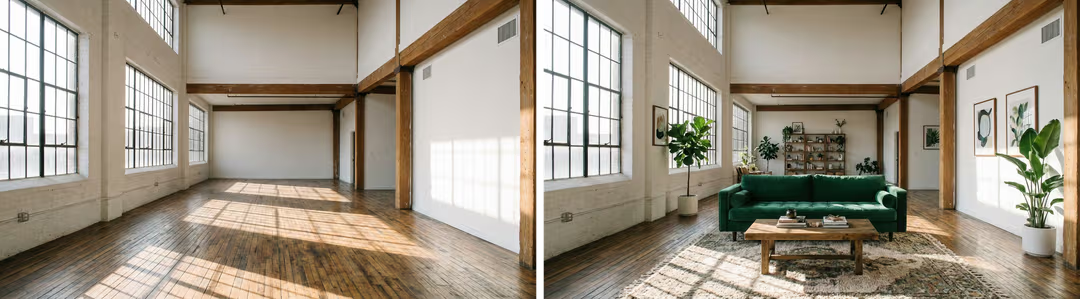
The prompt in this mode typically describes the transformation, not just a static scene. The model uses the two images as anchors, and the text guides the nature of the transition.
Reference-to-Video
The most technically sophisticated mode. You provide one or more reference images or short video clips of a person, character, or subject, and the model extracts their appearance to generate entirely new scenes featuring them.
Wan is the standout model for this capability.
This is particularly valuable for:
Brand mascots or recurring characters: Maintain visual identity across a content series without reshooting
Spokesperson videos at scale: Generate variations of a human presenter in different environments
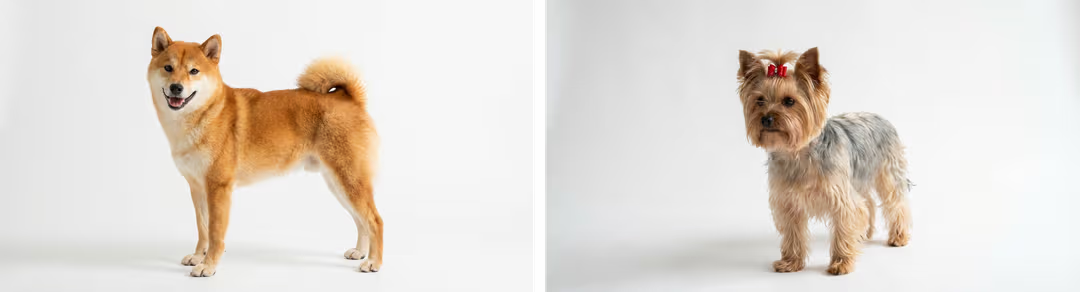
Pet or character content: Place familiar subjects into new scenes with natural-looking results
When working with multiple characters in the same scene, Wan recommends referencing them explicitly in your prompt using placeholder labels like character1 and character2.
Video example: Two dogs playing on a San Francisco beach — Wan v2.6 R2V Flash, 5 seconds, 1280×720
Video Editing (Style Transfer)
A distinct capability offered by Grok Imagine: you provide an existing video (rather than a text prompt or image) and describe a stylistic transformation. The model preserves the original motion and scene structure while applying the new visual style.
Examples of what's possible:
Convert live footage to watercolor painting
Shift a realistic scene to anime or comic-book style
Apply dramatic color grading or atmospheric effects
Video example: Live dog footage transformed into watercolor style — Grok Imagine
This is not inpainting or masking — it's a holistic transformation of the video's visual language while respecting the underlying motion.
Prompting for Video vs. Images
If you're coming from image generation, video prompting requires a different mental model. A few key differences:
Motion cues matter. Describe how things move, not just what they look like. "A cat sitting on a chair" will produce a static-looking video. "A cat stretching slowly on a chair, tail swaying" gives the model something to animate.
Camera language helps. Terms like "wide shot", "close-up", "slow push in", "tracking shot", and "pan left" are understood by most models and produce more cinematic results.
Audio direction (where supported). Models with native audio generation (Kling, Wan, Grok, Veo) can generate synchronized sound. You can guide this with descriptions like "waves crashing in the distance", "ambient café noise", or "upbeat acoustic guitar".
Duration and aspect ratio affect outputs. Most models support durations of 3–10 seconds. 16:9 is standard for landscape content; 9:16 for vertical/social. These parameters interact with the model's motion planning.
Seedance 2.0: Director-Level Control
What distinguishes Seedance 2.0 from other models isn't just benchmark scores — it's the depth of reference-based control it exposes to creators. While most models take one type of input and produce a video, Seedance 2.0 lets you combine multiple reference types simultaneously:
Style referencing: Upload a painting or image to define the color palette and lighting of the output
Motion referencing: Upload a rough video of a movement to dictate how characters or objects move
Audio referencing: Upload a soundtrack to dictate pacing, cuts, and sonic atmosphere
This creates a fundamentally different creative workflow — closer to directing than prompting. Rather than iterating blindly on text descriptions, you can anchor specific dimensions of the output to concrete references.
Multi-shot storytelling in a single generation is another standout: Seedance 2.0 can produce a 15-second clip that contains multiple camera cuts and scene transitions, generated in roughly 60 seconds. This is distinct from other models which typically produce a single uncut take.
Native audio quality is notably stronger than the competition. Music carries deep bass and cinematic warmth, dialogue includes precise lip-sync in 8+ languages (English, Chinese, Japanese, Korean, Spanish, Portuguese, Indonesian, and dialects), and sound effects land exactly on cue — all generated in a single pass.
Physics simulation is another differentiator. Internal benchmarks on SeedVideoBench-2.0 show Seedance 2.0 outperforming competitors in motion stability and physical consistency. High-action sequences — collisions, explosions, fabric tearing — have physical believability because the model calculates motion rather than interpolating it.
Video example: Seedance 2.0
A note on availability: Seedance 2.0 launched in China in February 2026 and faced an early controversy around deepfake and IP-infringing content going viral on social media. ByteDance subsequently disabled the Human Reference input and blocked real-person clip generation. International access remains limited — the model is available through select third-party platforms while broader distribution is pending.
Choosing the Right Model
Goal | Recommended Model |
|---|---|
Fastest iteration, simple prompts | Grok Imagine |
Highest realism and cinematic quality | Veo 3.1 or Seedance 2.0 |
Consistent character across scenes | Wan v2.6 or Seedance 2.0 |
Image animation with audio | Kling v2.6 (pro) |
Before/after transitions | Kling v3.0 or Seedance 2.0 |
Style transfer on existing video | Grok Imagine |
Multi-shot storytelling with cuts | Seedance 2.0 |
Director-level multimodal control | Seedance 2.0 |
Native multi-language lip-sync | Seedance 2.0 |
Longest single generation (15s) | Seedance 2.0 |
Where This Is Heading
The current generation of video AI models is still early. Clips are typically 3–10 seconds. Long-form coherence, complex narrative structure, and real-time generation are still active research frontiers. But the trajectory is clear: the gap between "AI video" and "produced video" is closing fast.
What's most significant about the current moment isn't any single model — it's the breadth of types of generation now available. Text-to-video for rapid prototyping, image-to-video for animating existing assets, reference-to-video for identity-consistent characters, and style transfer for transforming existing content are all production-ready today, at a cost and speed that would have been implausible two years ago.
Models referenced: Grok Imagine (xAI), Wan v2.6 (Alibaba), Kling v2.6 / v3.0 (Klingai), Veo 3.1 (Google), Seedance 2.0 (ByteDance)
Can I use AI-generated video commercially?
Each model has its own licensing terms. Kling, Wan, and Veo all offer commercial licenses for paid tiers, but terms vary — particularly around using reference images of real people. Always review the specific model's terms of service before using outputs in commercial work. Seedance 2.0's commercial availability outside China is still being established.
How long can AI-generated videos be right now?
Most models top out at around 10 seconds per generation. Seedance 2.0 is currently the exception, supporting up to 15 seconds. Longer content typically requires stitching multiple generations together — something models like Kling v3.0 and Wan partially address with multi-shot and scene transition support.
What's the difference between "pro" and "standard" mode in Kling?
Kling exposes two modes via its API. Standard mode is faster and cheaper, suitable for iteration and prototyping. Pro mode runs a heavier model pass, producing higher-detail motion, better texture consistency, and more natural transitions — worth the cost for final outputs.
Do these models actually generate audio, or is it added separately?
All five models listed support some form of audio, but the quality and approach differs significantly. Seedance 2.0 is the only model that generates video and audio in a single unified pass, meaning audio is tightly synchronized to visuals from the start. Other models either generate audio as a secondary step or have more limited audio fidelity. For anything requiring precise lip-sync or tight sound effect timing, Seedance 2.0 is currently the strongest option.
Can AI video models generate recognizable real people?
Technically, some models can — but most have policies against it, and those policies are actively enforced. Seedance 2.0 disabled its Human Reference input shortly after launch due to deepfake misuse. Kling and Wan have similar restrictions. Veo routes generations through Google's safety filters. For brand content, it's safer to work with original characters or stylized representations rather than real-person likenesses.
How important is the prompt for video quality?
Enormously. The gap between a vague prompt and a well-crafted one can mean the difference between unusable output and production-quality footage. Key practices: include explicit motion cues, use camera language ("wide shot", "slow push in"), describe lighting and atmosphere, and for models like Wan and Kling specify duration behavior (e.g., "gradual acceleration over 5 seconds"). Veo in particular rewards very dense, detailed prompts.
Which model is best for beginners?
Grok Imagine (xAI) is the easiest starting point — it follows instructions reliably, returns results quickly, and handles ambiguous prompts better than most. Kling in standard mode is also forgiving for newcomers. Save Veo and Seedance 2.0 for when you have a clearer vision of what you want to produce, as they reward detailed, deliberate prompting.
What's the typical generation time for these models?
It varies by model and resolution. Rough benchmarks at 1080p / 5 seconds: Grok Imagine: ~15–30 seconds Kling (standard): ~30–60 seconds Kling (pro): ~60–120 seconds Wan: ~45–90 seconds Veo: ~60–120 seconds Seedance 2.0: ~60 seconds for a 15-second clip at 2K These are approximations — actual times depend on queue load, resolution, and duration.
How do I animate a product photo without it looking unnatural?
The key is restraint. Describe subtle, physical motion rather than dramatic movement — steam rising, fabric shifting slightly, liquid rippling. The prompt "gentle ambient motion, warm light shifting subtly" will typically outperform "the product spins and zooms dramatically". For product work, Wan and Kling image-to-video modes tend to produce the most grounded, believable results.
Is Seedance 2.0 available to use right now?
Seedance 2.0 launched in China in February 2026 via ByteDance's Jimeng platform. International access is limited — it's available through a handful of third-party platforms, but there's no official global API yet. Availability is expected to expand through 2026, though the timeline is uncertain given the ongoing content moderation and IP discussions.