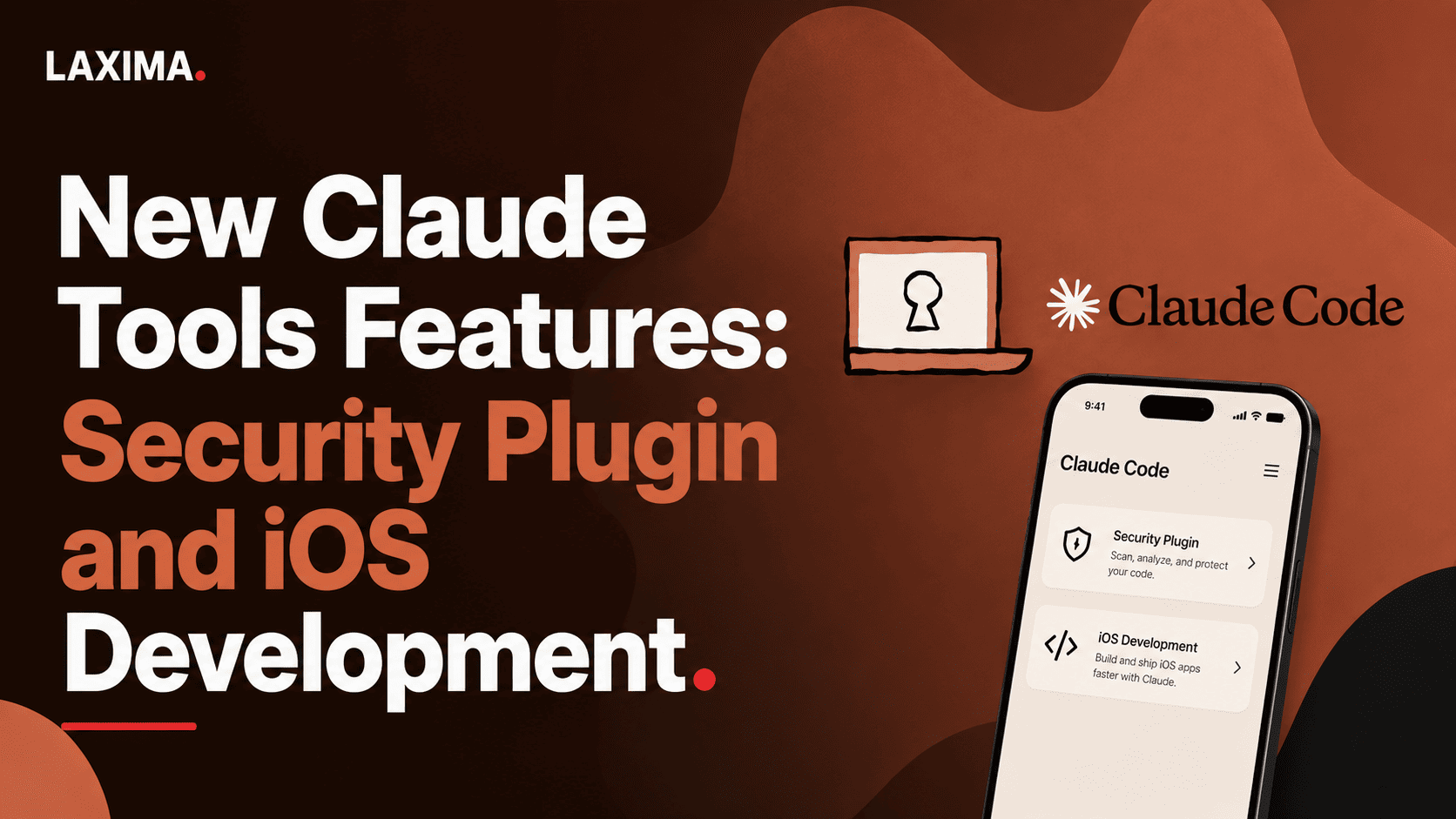
Claude’s latest tool updates add two concrete capabilities: the Claude Security plugin for repository scanning inside Claude Code, and an iOS Simulator pane in Claude Code Desktop for building and inspecting iPhone apps on macOS. The bigger shift is toward verification and testing, not just generating more code.
Key takeaways
Anthropic’s Claude Security plugin adds a
/claude-securitycommand with three jobs: scan a codebase, scan changes, and suggest patches, according to Anthropic documentation cited by MarkTechPost.The security workflow uses six phases and a three-lens verification panel, and a finding needs a 2-of-3 verifier quorum before it is kept in the report, according to the reported documentation summary.
Claude Code Desktop’s iOS Simulator pane requires Claude Desktop v1.24012.0 or later, a Mac, and Xcode with the iOS platform installed, according to Claude Code Docs.
Each simulator device belongs to one session, and Claude Code Desktop can open up to 4 simulator panes per session, according to Claude Code Docs.
The biggest operational risk with Claude Security is trust, not syntax: scans run in your session under your permissions and add no isolation of their own, according to the source summary.
The biggest practical limit with the iOS Simulator pane is platform scope: it works only in local desktop sessions on macOS and cannot control physical iPhones or iPads, according to Claude Code Docs.
What are the new Claude tools features?
The most notable new Claude tools features in the supplied source set are a security-scanning plugin for Claude Code and a built-in iOS Simulator pane for Claude Code Desktop. One is for code verification. The other is for visual app testing.
That split matters. A lot of AI tooling updates are still about producing more code, faster. These two features push in a different direction: inspect, verify, and observe. For teams shipping software, that is often the more useful improvement.
The two additions covered by the sources are:
Claude Security plugin: a beta plugin for Claude Code that scans a repository or diff, produces a structured report, and can suggest patch files for selected findings.
iOS Simulator pane: a Claude Code Desktop feature that opens Apple’s iOS Simulator next to the conversation so Claude and the user can run and inspect an iOS app.
If you are new to the Claude tooling stack, Claude Code is Anthropic’s coding environment for agentic software work, usually in terminal or desktop form. A plugin is an installable extension that adds commands or workflows. A dynamic workflow is a scripted orchestration pattern in which Claude coordinates multiple subagents for one task.
The broader pattern matches what we outlined in our guide to dynamic workflows in Claude Code: the value is increasingly in the harness around the model, not just the model itself.
Why do these Claude features matter more than they first appear?
They matter because they move Claude from “help me write code” toward “help me verify work under constraints.” That is a sturdier use case than raw generation.
Most teams do not struggle because they cannot produce one more function. They struggle because generated work is hard to trust, hard to test, and easy to approve too quickly. These features target that gap from two sides:
Claude Security adds structured adversarial review before a finding enters the final report.
The simulator pane gives a visible execution surface so app behavior is less abstract and easier to inspect.
That is why we would not describe these as productivity features first. They are trust-shaping features. Used well, they may slow down the most careless workflows, and that is a benefit.
A simple mental model helps:
Layer | Question it answers | New Claude feature |
|---|---|---|
Generation | Can Claude produce code or changes? | Not the focus of these updates |
Verification | Should we believe the finding or fix? | Claude Security plugin |
Observation | Can we see the app state and behavior? | iOS Simulator pane |
Governance | Under whose permissions and policies does this run? | Both features expose this issue clearly |
That last row deserves the most attention. Tool maturity is now less about flashy demos and more about permission boundaries, audit trails, and knowing when a human needs to stay in the loop.
How does the Claude Security plugin work?
It adds a single /claude-security command inside Claude Code and offers three jobs: scan a codebase, scan changes, and suggest patches. The workflow then uses multiple agents to research, verify, and report findings.
According to the competitor’s summary of Anthropic documentation, installation uses:
/plugin install claude-security@claude-plugins-official
/reload-plugins
If the marketplace is not found, the same source says you may first need:
/plugin marketplace add anthropics/claude-plugins-officialThe reported workflow structure matters because it shows how Anthropic is trying to cut false positives. MarkTechPost’s summary of the official docs says the scan uses six phases:
Inventory
Threat model
Research
Sweep
Panel
Adversarial
The same source says research runs across four categories: injection-and-input, auth-and-access, memory-and-unsafe, and crypto-and-secrets, with the memory lens dropped for fully memory-safe components.
That design choice makes sense. It avoids treating every language and stack as if they fail in the same way. In practice, a Python service and a Rust core should not be scanned with identical assumptions.
What gets reported?
A candidate issue does not make the final report just because one agent found it. It has to survive panel review.
Per the source summary, three independent verifiers assess each candidate through these lenses:
Reachability: can an attacker actually get to the vulnerable path?
Impact: if reachable, is the outcome materially harmful?
Defenses: do existing controls already block or reduce the issue?
A finding needs a 2-of-3 quorum to stay in the report. A unanimous 3-of-3 allows a high-confidence ceiling, a 2-of-3 result caps confidence at medium. That is a strong pattern because it ties confidence to process, not to model self-belief.
What artifacts does it write?
According to the same source, each scan writes a timestamped directory with three main outputs:
CLAUDE-SECURITY-RESULTS.mdfor human reviewCLAUDE-SECURITY-RESULTS.jsonlfor machine-readable processingCLAUDE-SECURITY-REVISION-<commit>.jsonas a revision stamp
This is one of the most useful parts of the feature. Good AI tooling does not just answer in chat. It leaves inspectable artifacts that fit into a review process.
How patch suggestion works
The plugin can also suggest patches as .patch files rather than editing your working tree automatically. The source says patches are built in a scratch clone and only written if an independent verifier can support three claims: the change fixes that finding, introduces no new vulnerability, and does not otherwise change behavior.
That is the right default. If you are evaluating agentic coding setups more broadly, compare this with the autonomy tradeoffs discussed in our Claude Code vs Codex vs Intent analysis.
What is the iOS Simulator pane in Claude Code Desktop?
It is a built-in pane that shows an iOS Simulator device next to your Claude conversation when Claude builds, launches, or checks an iOS app. It turns app testing from a text-only exchange into a shared visual surface.
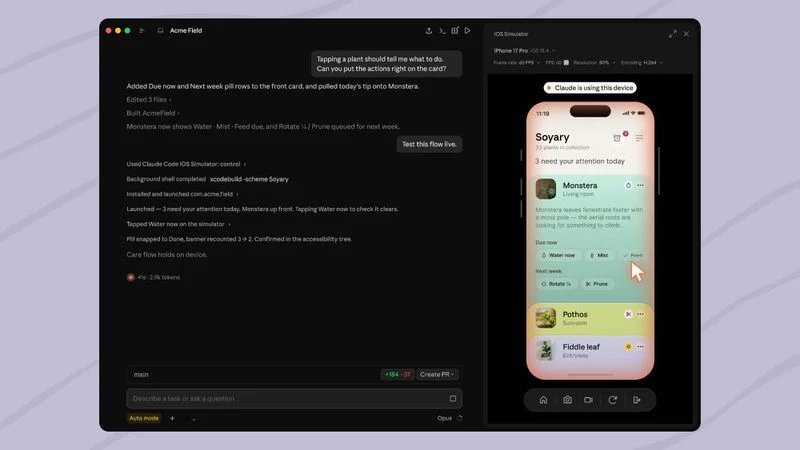
According to Claude Code Docs, the pane opens automatically when Claude runs the app in a simulator. The docs say it requires:
Claude Desktop v1.24012.0 or later
A Mac
Xcode with the iOS platform installed
The docs also state that the feature is available only in local sessions, not cloud or SSH sessions, because those sessions cannot reach simulators on your Mac.
What can you do with it?
You can watch Claude operate the app, or you can interact with the simulator yourself. The docs say users can tap, swipe, rotate the device, switch devices, save screenshots, and save screen recordings.
That matters for a simple reason: many UI bugs are easier to inspect visually than through logs or screenshots passed back and forth later. If you ask Claude to fix a layout issue and then relaunch the app in the simulator, you remove a lot of ambiguity.
How sessions and permissions work
According to the docs, each device belongs to the session that launched it, and Claude Code Desktop supports up to 4 panes per session. Devices Claude boots are shut down when no longer in use, including 10 minutes after detachment, while devices you boot yourself are not shut down automatically.
The first time Claude uses a simulator device, the app asks for consent. The docs say that consent covers control of the device and screenshots. They also warn that Claude’s screenshots are sent to Anthropic and retained under normal conversation retention settings, so users should not sign in to real accounts on devices Claude uses.
That warning should be treated as operating guidance, not setup trivia.
Which Claude tool should you use for which job?
Use Claude Security when the main question is “what could be wrong with this code?” Use the iOS Simulator pane when the main question is “what is this app actually doing on-screen?”
They solve different bottlenecks. One is about repository-level reasoning. The other is about interface-level observation.
Task | Best Claude feature | Why |
|---|---|---|
Review a full repo for likely security issues | Claude Security plugin | It supports whole-codebase scanning and structured verification |
Check whether a recent diff introduced a security problem | Claude Security plugin | It can scan a branch diff, PR diff, or single commit |
Generate a candidate fix without editing the repo directly | Claude Security plugin | It outputs patch files for human review |
See whether a new iOS screen renders correctly | iOS Simulator pane | It shows the running app visually in Desktop |
Test user flow behavior in an iPhone simulator | iOS Simulator pane | You and Claude can drive the same simulated device |
Run on a physical iPhone | Neither | The docs say Claude cannot control physical iPhones or iPads |
A practical rule: if the output should end up in Git review, use the security plugin. If the output should end up in human eyes, use the simulator pane.
What are the real risks and limits of these new Claude features?
The main risks are over-trust, permission sprawl, and scope confusion. These tools can improve workflows, but they do not remove the need for review.
Start with Claude Security. The competitor article’s source summary says scans run in your session under your permissions and add no isolation of their own. That means the feature is powerful in exactly the place where it is also risky. On a trusted internal repo, that may be acceptable. On an unfamiliar or hostile codebase, it is not.
Then consider the iOS Simulator pane. The docs are clear that screenshots taken by Claude are sent to Anthropic under normal conversation retention settings. If a team uses production credentials or customer data in a simulator, that is an avoidable governance mistake.
Here is the decision framework we recommend:
The 3-boundary check
Permission boundary: what can Claude touch on this machine or session?
Data boundary: what code, screenshots, secrets, or test accounts could leave the local environment?
Action boundary: does the tool only suggest changes, or can it execute them directly?
If you cannot answer all three in one minute, do not use the feature on sensitive work yet.
This is also why teams exploring local and more tightly controlled development stacks are looking harder at alternatives and hybrids, including local LLM setups for agentic coding.
What results should teams realistically expect?
Expect better triage and faster inspection, not perfect security or autonomous QA. These features improve workflow quality when used as amplifiers for experienced reviewers.
That may sound conservative. It is also the expectation most likely to hold up in practice.
With Claude Security, the likely result is a better first-pass map of suspicious code paths and a cleaner handoff into human review. The multi-phase structure and panel verification should reduce obvious low-quality findings compared with a single-pass “review my code” prompt. It still does not replace static application security testing, dependency scanning, or code review, even the source summary says so.
With the simulator pane, the likely result is shorter feedback loops for interface and flow debugging. The best use cases are:
layout regressions
navigation bugs
state mismatches after a fix
quick validation on named simulator devices
The weak use cases are worth naming too:
formal mobile QA signoff
testing physical-device-only behavior
sensitive account flows using real credentials
In other words, these are strong review acceleration tools, not final-authority tools.
How should you adopt Claude Security without creating false confidence?
Adopt it as a tiered review layer, not as a replacement for existing security controls. Put it where it can narrow human attention, not where it can silently approve risk.
A practical rollout sequence looks like this:
Start with diff scans, not full-repo scans, on a low-risk internal project.
Compare findings against your current review process to learn the tool’s bias toward your codebase.
Require manual review of every suggested patch before any application.
Keep existing SAST and dependency tools in place.
Use sandboxing for unfamiliar repos, based on the trust warning in the source summary.
A mature team should also define success before rollout. Good success criteria are operational, not magical:
Did the tool surface issues reviewers would otherwise miss?
Did it produce artifacts that fit your existing review workflow?
Did it reduce noise enough to justify token and review cost?
Did users understand when not to trust it?
If you want broader context on Anthropic’s direction for technical users, our technical guide to Claude’s models, Claude Code, and workflows maps where these tools fit.
How should product and engineering teams use the iOS Simulator pane well?
Use it for shared visibility during build-fix-verify loops. Treat it as a live inspection surface, not as a replacement for a mobile testing stack.
The best working pattern is simple:
Ask Claude to build and launch the app in a named simulator.
Watch the first-run behavior in the pane.
Navigate manually to the exact screen if needed.
Ask Claude to inspect or fix one issue at a time.
Relaunch and verify visually.
Two mistakes are common.
First, users give vague instructions like “check the app.” The docs imply specificity helps: name the device and the task, such as testing a signup flow or checking a screen. Second, users interact while Claude is controlling the simulator, which muddies the result. The docs say the pane shows a “Claude is using this device” badge, and that should be treated as a pause signal.
For non-developers, this feature also hints at a broader shift: Claude-based tooling is becoming more legible to wider teams because the work is visible. That trend also shows up in tools like Cowork, which we covered in our Anthropic Cowork guide.
What did competing coverage miss?
The main missing piece is the operating model. Most coverage explains what the features do. Fewer pieces explain how to decide when to trust them, where to place them in a workflow, and what mistakes to avoid.
Three additions matter in practice:
1. Verification is the product, not the scan
The standout design choice in Claude Security is not “multi-agent.” It is that reported confidence is constrained by independent panel results. Teams should evaluate future AI security tools on this standard: what is mechanically verified, and what is only asserted?
2. Visible execution changes adoption
The simulator pane is not just a convenience for iOS developers. It makes Claude’s work inspectable in real time. That tends to improve user trust more than another hidden automation layer would.
3. Governance should drive feature selection
If a feature sends screenshots off-device or runs with local permissions, that is not a side note. It is part of the feature. Teams should pick tools partly on governance fit, not just task fit.
Should you use these new Claude tools now?
Yes, if you have a concrete workflow problem they solve and you can enforce review boundaries. No, if you are looking for hands-free trust.
Use Claude Security now if you want deeper, artifact-producing security review inside Claude Code and can keep a human reviewer on every finding and patch. Use the iOS Simulator pane now if your team builds iOS apps on Macs and wants tighter debug loops with visible execution. Skip both, or limit them sharply, if your current environment cannot tolerate local-permission execution or screenshot retention risk.
The practical lesson is simple: the newest Claude tools are most useful when they make work easier to inspect, not when they tempt you to inspect less.
For a broader stream of frontier AI tool changes like these, follow the free LAXIMA AI Signal feed.
Sources:
https://claude.com/product/claude-security
https://code.claude.com/docs/en/desktop-ios-simulator
Frequently asked questions
Does Claude Security automatically fix vulnerabilities in my repository?
No. Based on the supplied source summary, Claude Security can suggest patches as .patch files, but it does not apply them automatically to your repository. The patches are produced for review and application by the user, which keeps a human approval step in the workflow.
Can Claude Code Desktop control a real iPhone with the new simulator feature?
No. Claude Code Docs say the simulator tools work with simulated devices only and cannot control a physical iPhone or iPad. To test on real hardware, you need to run the app from Xcode yourself and then describe what you see or share screenshots with Claude.
Do the new Claude tools work in cloud or SSH sessions?
Not all of them. The supplied Claude Code Docs say the iOS Simulator pane is available only in local sessions because cloud and SSH sessions cannot access simulators on your Mac. The source set does not establish the same limitation for Claude Security, so editors should avoid generalizing across both features.
What is the main benefit of Claude Security compared with a simple AI code review prompt?
The main difference is structured verification. The supplied source summary says Claude Security uses a six-phase workflow and a three-lens panel for each candidate finding, with a 2-of-3 quorum needed to keep the issue in the report. That is more rigorous than a one-shot review prompt.
What should teams avoid when using the iOS Simulator pane?
Avoid using real customer accounts or sensitive credentials in simulator sessions Claude can access. Claude Code Docs say screenshots Claude takes on the device are sent to Anthropic and retained under normal conversation settings, so sensitive test data should be excluded from those flows.