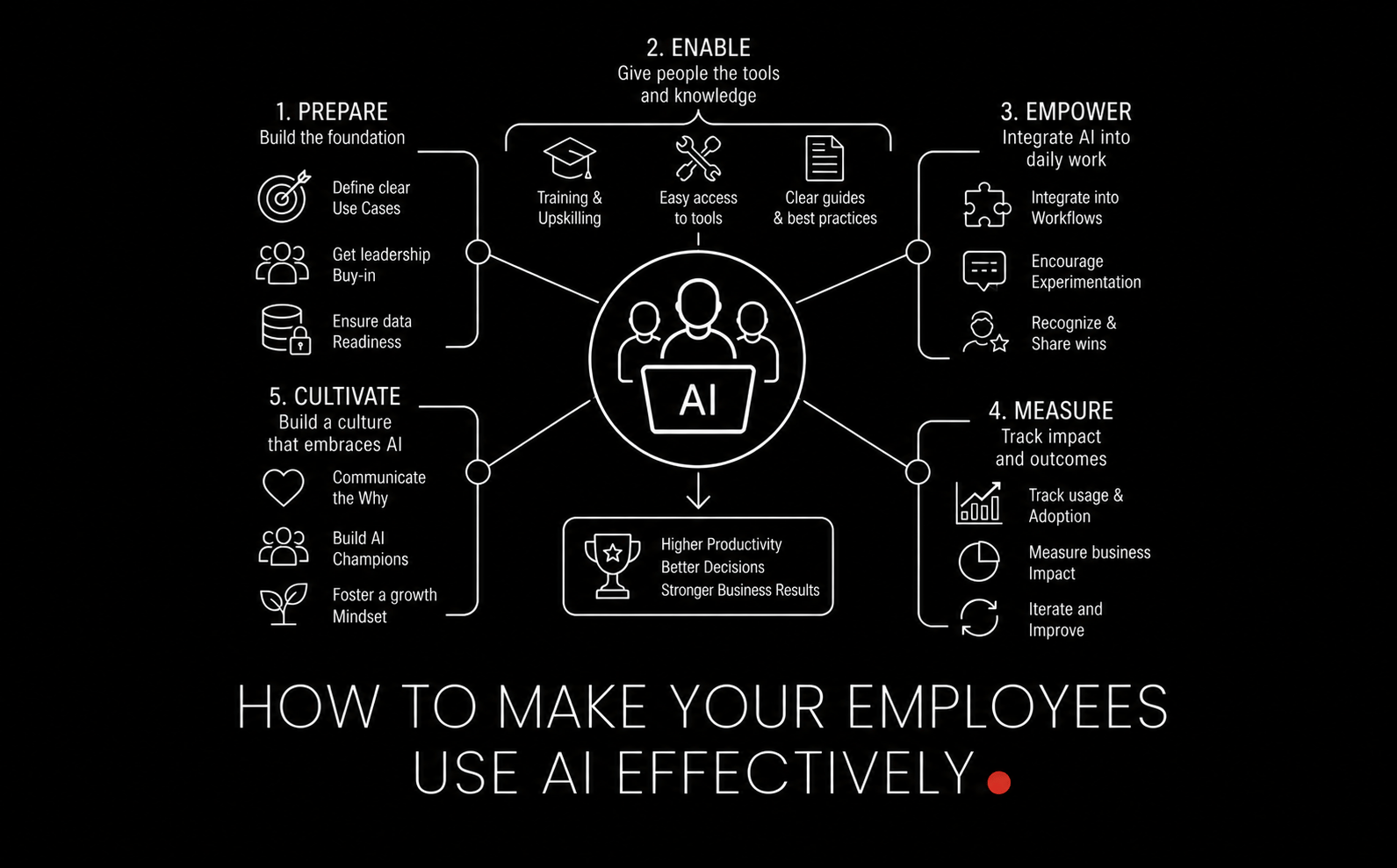
Most companies do not have an AI capability problem. They have an adoption problem.
Buying licenses is easy. Getting employees to use AI in a way that is repeatable, safe, and measurably useful is the hard part. The teams that win are not the ones with the most enthusiasm. They are the ones that turn AI from a novelty into an operating system for everyday work.
The practical rule is simple: AI works best as a force multiplier for employees who already understand the job, the workflow, and the desired outcome. Your goal is not to replace judgment. Your goal is to increase throughput, reduce low-value work, and improve consistency without creating new risk.
This guide shows how operations leaders can make that happen.
If your organization is still early, start by benchmarking current process maturity with an AI readiness assessment. It is much easier to improve adoption when you know whether the bottleneck is tooling, data, training, or governance.
Why employees do not use AI well
Most failed AI rollouts follow the same pattern:
Leadership announces that AI is important.
Employees get access to one or two tools.
There is little role-specific training.
No one defines what “good usage” looks like.
Managers cannot tell which use cases are safe, useful, or worth scaling.
That creates two predictable behaviors. Some employees ignore the tools entirely. Others use them in an uncontrolled way for tasks they should not automate yet.
The deeper issue is that AI is not magic. It amplifies existing strengths and weaknesses. A strong employee with domain knowledge can use AI to draft, analyze, summarize, structure, and troubleshoot faster. A weak process with unclear requirements will simply produce faster confusion.
This is why broad slogans like “everyone should use AI” usually underperform. Employees need a clearer answer to five questions:
What tasks should I use AI for?
What tasks should I never use AI for?
Which tool should I use for which job?
What does a good prompt or workflow look like?
How do I verify the result before acting on it?
If you do not answer those, adoption remains shallow.
Start with workflows, not with tools
The most common rollout mistake is starting with a model or app selection discussion before identifying where work actually gets stuck.
Operations teams should begin with workflow analysis:
Which tasks are repetitive?
Which tasks are document-heavy?
Which tasks require synthesis across many sources?
Which tasks have clear inputs and acceptable outputs?
Which tasks consume highly paid time but do not require highly paid judgment?
Those are your AI adoption candidates.
Good early targets include:
Drafting internal emails and status updates
Meeting summaries and action item extraction
SOP first drafts
Vendor comparison summaries
Policy Q&A over approved internal documentation
Ticket triage and categorization
Spreadsheet formula generation and data cleanup
Customer service response drafting with human approval
Bad early targets include:
High-risk customer promises without review
Legal or compliance decisions without approved sources
Production system changes without controls
Financial decisions based on unverified model outputs
Anything involving sensitive data before governance is in place
When teams move from “use AI more” to “use AI for these five tasks in this exact process,” adoption rises quickly.
The AI force multiplier is real, but only with domain expertise
One of the most important mindset shifts for leaders is this: AI rarely eliminates the value of expertise. It increases the output of people who already know what good looks like.
An experienced operations manager can use AI to:
Turn rough notes into a decision memo
Identify missing assumptions in a process redesign
Draft multiple variants of a communication plan
Spot edge cases in a handoff process
Create training materials from existing SOPs
A new hire with weak process knowledge may use the exact same tool and still produce lower-quality work because they cannot evaluate the output.
This has two implications for rollout strategy:
Do not treat AI adoption as a substitute for functional training.
Train your strongest operators first, then let them codify winning patterns for everyone else.
At LAXIMA, we see this repeatedly: the highest ROI usually comes from pairing AI with teams that already have strong operating discipline. AI does not fix broken handoffs, weak documentation, or unclear ownership. It scales whatever is already there.
Build a role-based adoption plan
Employees do not need generic AI training. They need role-based playbooks.
A finance analyst, a support manager, and an operations coordinator should not all receive the same examples, prompts, or guardrails. The fastest path to effective use is to define AI by role and by job-to-be-done.
What a role-based playbook should include
Top 5-10 approved use cases for that role
Approved tools and models
Approved data sources
Prompt templates or workflow templates
Human review requirements
Escalation rules for risky outputs
Examples of good and bad usage
Example: operations coordinator
Task | How AI helps | Human review needed? |
|---|---|---|
Meeting notes | Summarize, assign owners, extract deadlines | Yes |
SOP drafting | Convert bullet notes into draft process docs | Yes |
Vendor research | Compare features and flag differences | Yes |
Status reporting | Turn raw updates into weekly summaries | Yes |
Policy interpretation | Answer only from approved knowledge base | Yes, mandatory |
This kind of specificity removes ambiguity and gives managers something concrete to coach against.
Train employees on judgment, not just prompting
Prompting matters, but it is not the main skill gap in most organizations. The bigger gap is evaluation.
Employees need to know how to ask:
Is this output complete?
Is it grounded in the right source material?
What assumptions did the model make?
What is missing?
What would make this unsafe to act on?
In practice, effective AI training should include four layers.
1. Task selection
Teach employees which work is appropriate for AI and which work requires direct human ownership.
2. Instruction quality
Teach them to provide context, desired output format, constraints, examples, and success criteria.
3. Verification
Teach them to fact-check outputs, compare against source documents, and test recommendations before use.
4. Workflow integration
Teach them how AI fits into the actual process rather than becoming a side activity that creates more copy-paste work.
For more advanced teams, this often evolves into reusable prompt systems, tool routing, and persistent instructions. That is especially visible in technical environments, where teams build repeatable agent behaviors rather than relying on ad hoc prompts. Our article on building AI skills for Claude Code in DevOps workflows is a useful example of what structured, repeatable AI usage looks like when you stop treating the model like a chatbot and start treating it like part of the workflow.
Create clear AI policies employees can actually follow
Most AI policies fail because they are written either too vaguely or too restrictively.
If the policy says “be careful with confidential data,” employees are left to guess. If the policy says “never use AI for anything sensitive,” employees will work around it using personal tools.
A usable AI policy should define:
Which tools are approved
What data can and cannot be entered
Which tasks require human approval before action
Which outputs must cite approved sources
When employees must disclose AI assistance
How to report errors or unsafe behavior
A practical traffic-light policy model
Green: low-risk tasks such as drafting, summarization, formatting, brainstorming, and internal note cleanup using approved tools.
Yellow: medium-risk tasks such as customer communications, policy interpretation, analysis, or recommendations that require human review.
Red: prohibited tasks such as uploading restricted data into unapproved tools, executing high-impact decisions without review, or making changes to live systems without controls.
This is also where retrieval matters. If employees need AI to answer questions about internal policy, contracts, or procedures, generic public models alone are not enough. You need a trusted retrieval layer over approved company knowledge. If you are planning that path, this executive guide to RAG explains how to turn company documents into grounded AI responses instead of guesses.
Reduce friction: the best AI system is the one inside the workflow
If employees have to leave their main tools, copy content into a chat window, rewrite the prompt from scratch, and then manually move the result back, usage drops.
Adoption rises when AI is embedded where work already happens:
Inside email and docs
Inside ticketing systems
Inside CRM workflows
Inside spreadsheets
Inside internal knowledge systems
Inside IDEs and technical tools for engineering teams
This is one reason agentic systems are becoming more useful than standalone chat interfaces. Instead of asking employees to orchestrate multiple steps manually, the system can gather context, take approved actions, and return outputs in a standard format. If you are evaluating that maturity level, our guide to implementing agentic AI systems outlines when it makes sense to move beyond simple chat assistance.
Design principle: save steps, not seconds
A lot of AI demos save 30 seconds. Very few save 8 workflow steps. For operations teams, step reduction matters more.
For example:
Bad implementation: employee pastes meeting transcript into a chatbot and manually formats the summary.
Better implementation: transcript is automatically summarized into a standard action-item template.
Best implementation: summary is generated, action owners are mapped, due dates are extracted, and tasks are pushed into the project system for approval.
The more operationally integrated the workflow, the more likely employees are to use it consistently.
Measure adoption with business metrics, not vanity metrics
Many teams report AI success using weak metrics such as login counts, prompts sent, or licenses assigned. Those numbers tell you access, not value.
Operations leaders should track metrics such as:
Time saved per workflow
Cycle time reduction
Output quality improvement
Error rate reduction
Percentage of tasks completed within SLA
Manager rework required
Adoption by role and use case
Incidents or policy violations
A simple ROI baseline
Take one workflow. Measure current state. Then measure AI-assisted state over 2-4 weeks.
Example:
Weekly reporting takes 4 managers 2 hours each = 8 hours per week
Loaded labor cost = $70 per hour
Weekly cost = $560
AI-assisted workflow reduces effort by 50% = 4 hours saved
Weekly value = $280
Annualized value = roughly $14,500 for one reporting workflow
Now multiply that by 10 to 20 workflows and the economics become meaningful. If you want a faster way to estimate this across teams, use LAXIMA’s AI savings calculator to model time and cost impact before you scale.
Give managers a coaching framework
AI adoption becomes durable when direct managers reinforce it in weekly work, not when it remains an innovation-side project.
Managers should be trained to ask:
Which of your recurring tasks could be AI-assisted this week?
What prompt or workflow did you use?
How did you verify the result?
Where did AI save time, and where did it create friction?
What pattern is worth documenting for the rest of the team?
This creates a learning loop. The organization starts capturing working prompts, reusable instructions, and approved automations. Over time, the best individual habits become team standards.
Do not ignore the context problem
One reason employees get weak results is that they give the model too little context, or they overload it with the wrong context.
Good AI usage depends on providing the right materials in the right structure:
Relevant background only
Current version of the process or policy
Desired output format
Examples of acceptable outputs
Constraints and non-negotiables
As companies move from simple prompting to AI agents and multi-step workflows, context quality becomes a major operational issue. Poor context leads to drift, inconsistency, and what many teams experience as “it worked last week, but now it is weird.” For a deeper view, our article on the AI agent memory problem covers why persistent memory and context management matter once AI becomes part of repeated business operations.
For day-to-day usage, even a basic step helps: standardize what employees provide to the model. A one-page task brief template can improve output quality more than another hour of generic prompt training.
Roll out in phases, not all at once
The best adoption programs usually follow a phased model.
Phase 1: identify and pilot
Choose 3-5 low-risk, high-frequency workflows
Select one team with strong managers
Define baseline metrics
Create role-based playbooks
Phase 2: standardize and govern
Document winning prompts and workflows
Define review rules and approval controls
Clarify the policy model
Train managers on coaching and verification
Phase 3: integrate and automate
Embed AI into core systems
Add retrieval over approved knowledge
Automate multi-step workflows where appropriate
Instrument performance and risk metrics
Phase 4: scale and optimize
Expand by role and department
Retire low-value experiments
Continuously refresh playbooks
Review ROI quarterly
This phased approach avoids a common trap: organization-wide enthusiasm with no repeatable operating model.
What effective employee AI usage looks like in practice
You know AI adoption is working when:
Employees can name the exact tasks they use AI for
Managers can explain the review standard
Outputs follow a repeatable format
Teams use approved data and tools
There is less manual rework, not more
Cycle times fall without a rise in quality issues
Useful patterns are documented and reused
In other words, effective use is not just frequent use. It is safe, structured, and operationally valuable use.
Common mistakes to avoid
Mandating usage without defining use cases. This creates performative adoption.
Over-indexing on prompting tricks. Judgment and workflow design matter more.
Ignoring governance. Employees will fill the policy gap with risky improvisation.
Choosing tools before workflows. Start with bottlenecks, not vendor demos.
Measuring activity instead of outcomes. Prompt volume is not business value.
Assuming one training session is enough. Adoption requires reinforcement, examples, and iteration.
The LAXIMA point of view
AI adoption is not a software deployment project. It is an operating model change.
The organizations that get real value do three things well:
They target specific workflows where AI can reduce effort or improve consistency.
They wrap those workflows in clear guardrails, source control, and review standards.
They turn individual wins into team-wide systems.
That is why the right question is not “How do we get employees to use AI?” The better question is “Which parts of work should be AI-assisted, under what rules, with what proof of value?”
Once you answer that, usage tends to follow.
FAQ
How do you encourage employees to use AI without forcing it?
Give them approved use cases that remove annoying work, such as summarization, first drafts, reporting, and document cleanup. If AI clearly saves time in their actual workflow, adoption grows naturally.
What is the best way to train employees on AI?
Use role-based training tied to real tasks. Show employees what to use AI for, what not to use it for, how to verify outputs, and what good results look like.
Should every employee be using AI?
Not in the same way. Different roles need different tools, policies, and workflows. Universal access can make sense, but universal usage expectations usually do not.
How do you measure whether AI adoption is working?
Track cycle time, time saved, output quality, rework, SLA performance, and error rates by workflow. Avoid relying only on license counts or prompt volume.
What stops AI adoption from becoming risky?
Clear approved tools, data handling rules, human review requirements, grounded answers from trusted sources, and manager oversight. Adoption and governance have to be built together.